


Description
Item specifics
Brand Name: GZGMET
Model Number: GM-ID
Support ID cards: uEM4001, 4100 125khz
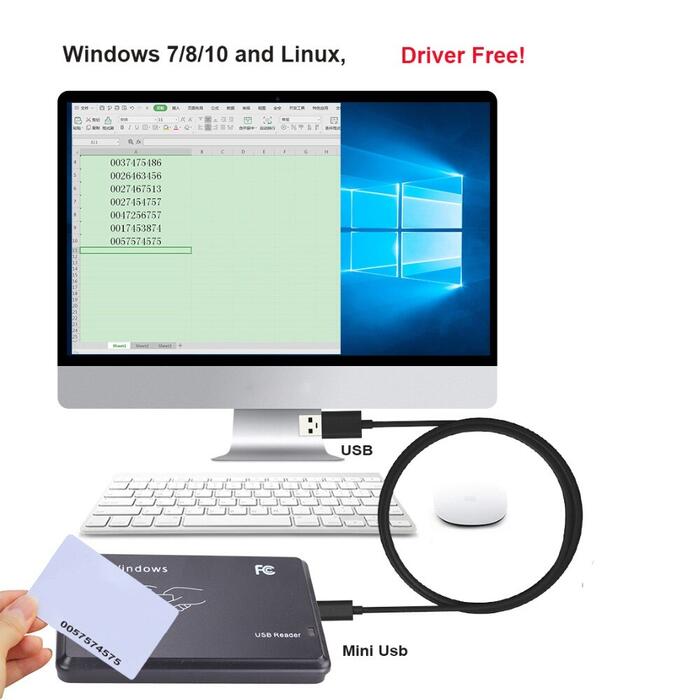
Support System: Windows 7/8/10 ,Linux
Product Description
What Include:
1 x ID card reader
1 x USB cable
Notes:
Support uEM4001, 4100, or its compatible RFID, 125Khz ID card.
Only read ID card with 10 numbers, Can Not write or copy.
USB port EM4001 125khz RFID ID Contactless Proximity Smart Card Reader support window system
Features:
Brand new and high quality.
Support uEM4001, 4100, or its compatible RFID, ID card.
Read 10 digits of the RFID/Proximity card. *If you need 8-digital reader please contact with us.
Frequency: 125Khz.
Support Windows95/98/2000/XP.
Power: DC 5V(+-5%)
Reading distance: 5-8cm
Interface: USB.
Plug and play , no need driver and any software.
Only Read can not copy and write.
Specifics
The ID card reader is a 125kHz driverless read ID card reader. In the process of use, you can freely insert (plug and play), without external power supply, the user does not need to load any driver, can read the serial number in the RFID card and output to the computer through the data interface, which is equivalent to the automatic keyboard input .
Parameter
Support Chip
TK4100?EM4100
Support OS
Windows 98 XP2000CE7MEAndroid
Work Distance
0~80MM
Read Time
<100MS Speed 0.2S Time interval 0.5S Port USB Size 104MM×68MM×10MM Power USB Weight 110G working environment temperature(-20?~85?) humidity(5%~95%) Operating Voltage 5V Working current 100mA Indicator LED indicator Built-in speaker Buzzer, control LED and buzzer Output format 10-digit (other formats consult with us ) How to use and precautions Instructions After the card reader is connected to the computer, the card reader enters the self-test and initialization from the "" sound, and the card reader has entered the state of waiting for the card to be swiped, and the indicator light is "red" at this moment. Open the computer s output software (such as: Notepad WORDEXCEL and other editors), put the card close to the card reader, the red light flashes green and then turns red, and the buzzer sounds to send data, that is, automatically The card number is displayed at the cursor of the computer. Detect reader is connected to the computer The card reader enters the swipe state, open the computer “Device Manager”, check whether the ergonomic input device appears in the option menu. If it appears, it indicates that the device has successfully connected to the computer. Precautions and simple troubleshooting If the data cable is directly inserted into the charging plug, the card reading will be unsuccessful. There are many factors affecting the card reading distance. Due to different protocols, different antenna designs, surrounding environments (mainly metal objects) and different cards will affect the actual card reading distance. If the reader reads the card too long, it will cause the card to be unstable or fail, and avoid reading the card in a critical state (the distance that can just be read). At the same time, two card readers that are too close will also interfere with each other. In the way of reading the card, it is recommended that the card is directly adjacent to the card reader, and the card reading method that is quickly swiped from the side by the card is not acceptable, and the card is not guaranteed to be successful. When swiping, it is recommended not to operate the mouse to avoid sending data errors.? The length of the communication cable between the card reader and the computer should be less than 15 meters. Swipe does not respond Whether the interface is plugged in; whether the RF card is a compatible RFID card; whether the RF card is bad; whether the RF card is in the card reading range? Error data Whether the mouse is operated when the card is swiped; whether the card is read in an environment with strong electromagnetic interference; whether the communication cable between the card reader and the computer is too long; whether the card is in a critical state. Application field Data entry, information inquiry, Internet cafe registration, book borrowing, conference sign-in, access control, etc. Packaging Details Unit Type: piece Package Weight: 0.12kg (0.26lb.) Package Size: 15cm x 15cm x 8cm (5.91in x 5.91in x 3.15in)






Reviews
There are no reviews yet.